Synastry Chart Endpoint #
POST /api/v5/chart/synastry #
This endpoint generates a synastry chart (relationship compatibility chart) as a dual-wheel SVG visualization. Synastry is the astrological technique of comparing two birth charts to analyze relationship dynamics, compatibility, and potential challenges between two people.
Chart Preview #
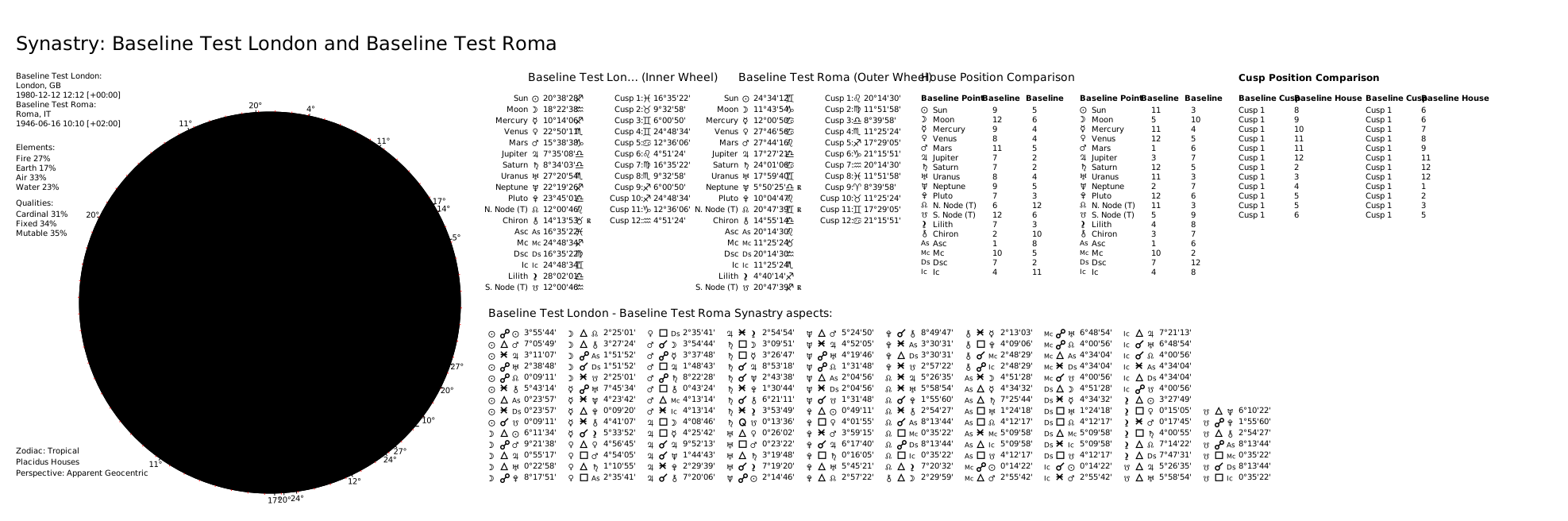
The chart displays:
- Inner Wheel: The first subject’s natal chart
- Outer Wheel: The second subject’s natal chart
- Inter-Aspects: The astrological aspects (connections) between the two charts
- Optional House Comparison Table: Shows how each person’s planets fall into the other’s houses
Use cases:
- Romantic Compatibility Analysis: Evaluate relationship potential between partners
- Business Partnerships: Assess professional compatibility
- Family Dynamics: Understand parent-child or sibling relationships
- Friendship Analysis: Explore platonic connections
Request Body #
first_subject(object, required): Inner wheel subject. See Subject Object Reference.{ "name": "Inner", "year": 1990, "month": 1, "day": 1, "hour": 12, "minute": 0, "city": "London", "nation": "GB", "longitude": -0.1278, "latitude": 51.5074, "timezone": "Europe/London" }second_subject(object, required): Outer wheel subject. Same structure asfirst_subject.{ "name": "Outer", "year": 1992, "month": 5, "day": 15, "hour": 18, "minute": 30, "city": "New York", "nation": "US", "longitude": -74.006, "latitude": 40.7128, "timezone": "America/New_York" }
Synastry-specific options (optional):
include_house_comparison(boolean): Include house overlay comparison in the data. Default:true.include_relationship_score(boolean): Include relationship score analysis in the data. Default:true.
Computation options (optional):
active_points(array of strings): Override which celestial points are included. See Active Points.active_aspects(array of objects): Override which aspects are calculated and their orbs. See Active Aspects.distribution_method(string):"weighted"(default) or"pure_count".custom_distribution_weights(object): Custom weights map for weighted distribution.
Rendering options (optional):
theme(string): Visual theme. Default:"classic". See Themes.language(string): Language for chart labels. Default:"EN". See Languages.style(string):"classic"(default) or"modern".split_chart(boolean): Return separatechart_wheelandchart_gridSVGs. Default:false.transparent_background(boolean): Render with transparent background. Default:false.custom_title(string): Override the chart title (max 40 characters).show_house_position_comparison(boolean): Show the house comparison table. Default:true.show_cusp_position_comparison(boolean): Show cusp comparison grids for both subjects. Default:true.show_degree_indicators(boolean): Show radial lines and degree numbers. Default:true.show_aspect_icons(boolean): Show aspect icons on aspect lines. Default:true.show_zodiac_background_ring(boolean): Show colored zodiac wedges ("modern"style only). Default:true.double_chart_aspect_grid_type(string): Aspect display layout —"list"(default, vertical) or"table"(grid matrix).
Complete Request Example #
{
    "first_subject": {
        "name": "Inner",
        "year": 1990,
        "month": 1,
        "day": 1,
        "hour": 12,
        "minute": 0,
        "city": "London",
        "nation": "GB",
        "longitude": -0.1278,
        "latitude": 51.5074,
        "timezone": "Europe/London"
    },
    "second_subject": {
        "name": "Outer",
        "year": 1992,
        "month": 5,
        "day": 15,
        "hour": 18,
        "minute": 30,
        "city": "New York",
        "nation": "US",
        "longitude": -74.006,
        "latitude": 40.7128,
        "timezone": "America/New_York"
    },
    "theme": "classic",
    "style": "modern",
    "show_zodiac_background_ring": true,
    "double_chart_aspect_grid_type": "list",
    "split_chart": true
}
Response Body #
status(string):"OK".chart_data(object): Synastry data (same structure as the Synastry Chart Data endpoint).chart(string): SVG string (whensplit_chartisfalse).chart_wheel(string): SVG of the dual wheel (whensplit_chartistrue).chart_grid(string): SVG of the aspect grid (whensplit_chartistrue).
Complete Response Example #
{
  "status": "OK",
  "chart_data": { ... },
  "chart_wheel": "<svg ...> ... </svg>",
  "chart_grid": "<svg ...> ... </svg>"
}