Composite Chart Endpoint #
POST /api/v5/chart/composite #
This endpoint generates a composite chart as a single-wheel SVG visualization. Unlike synastry (which compares two separate charts), a composite chart creates a completely new chart by calculating the mathematical midpoints between the two subjects’ planetary positions. This resulting chart represents the relationship itself as a unique entity.
Chart Preview #
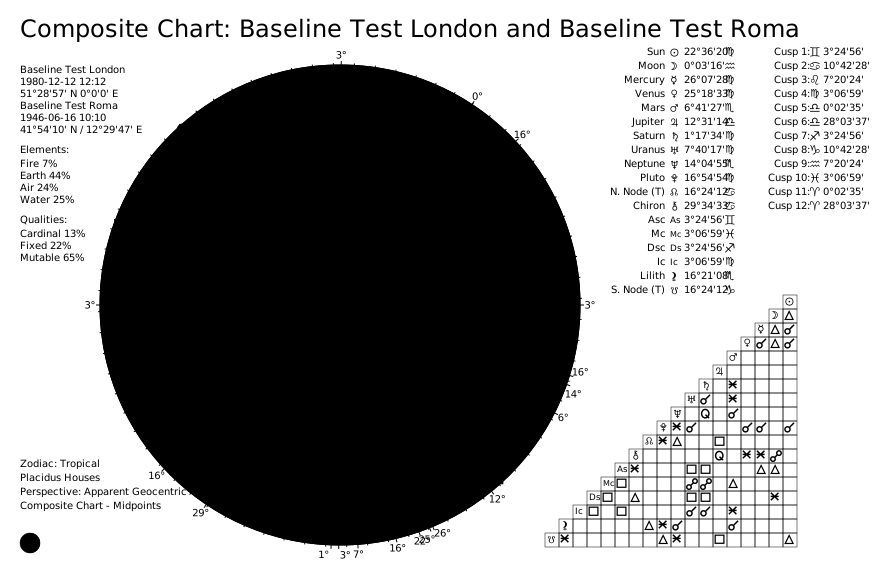
Key Concept: The composite chart answers the question: "What is the nature of this relationship?" rather than "How do these two people interact?" It symbolizes the relationship’s purpose, destiny, and core characteristics.
Calculation Method:
- Each planet’s position is the midpoint between the two subjects’ corresponding planets
- House cusps are similarly calculated from midpoints
- The result is a standalone chart representing the relationship’s “soul”
Use cases:
- Relationship Purpose Analysis: Understand the deeper meaning and mission of a partnership
- Couple’s Counseling: Explore the relationship’s inherent strengths and challenges
- Business Ventures: Analyze the potential and character of a partnership
- Long-term Forecasting: See how the relationship evolves through transits to the composite chart
Request Body #
first_subject(object, required): First partner. See Subject Object Reference.{ "name": "Partner A", "year": 1980, "month": 1, "day": 1, "hour": 12, "minute": 0, "city": "Rome", "nation": "IT", "longitude": 12.4964, "latitude": 41.9028, "timezone": "Europe/Rome" }second_subject(object, required): Second partner. Same structure asfirst_subject.{ "name": "Partner B", "year": 1982, "month": 3, "day": 15, "hour": 14, "minute": 30, "city": "Milan", "nation": "IT", "longitude": 9.19, "latitude": 45.4642, "timezone": "Europe/Rome" }
Computation options (optional):
active_points(array of strings): Override which celestial points are included. See Active Points.active_aspects(array of objects): Override which aspects are calculated and their orbs. See Active Aspects.distribution_method(string):"weighted"(default) or"pure_count".custom_distribution_weights(object): Custom weights map for weighted distribution.
Rendering options (optional):
theme(string): Visual theme. Default:"classic". See Themes.language(string): Language for chart labels. Default:"EN". See Languages.style(string):"classic"(default) or"modern".split_chart(boolean): Return separatechart_wheelandchart_gridSVGs. Default:false.transparent_background(boolean): Render with transparent background. Default:false.custom_title(string): Override the chart title (max 40 characters).show_house_position_comparison(boolean): Show the house/points comparison table. Default:true.show_degree_indicators(boolean): Show radial lines and degree numbers. Default:true.show_aspect_icons(boolean): Show aspect icons on aspect lines. Default:true.show_zodiac_background_ring(boolean): Show colored zodiac wedges ("modern"style only). Default:true.
Complete Request Example #
{
    "first_subject": {
        "name": "Partner A",
        "year": 1980,
        "month": 1,
        "day": 1,
        "hour": 12,
        "minute": 0,
        "city": "Rome",
        "nation": "IT",
        "longitude": 12.4964,
        "latitude": 41.9028,
        "timezone": "Europe/Rome"
    },
    "second_subject": {
        "name": "Partner B",
        "year": 1982,
        "month": 3,
        "day": 15,
        "hour": 14,
        "minute": 30,
        "city": "Milan",
        "nation": "IT",
        "longitude": 9.19,
        "latitude": 45.4642,
        "timezone": "Europe/Rome"
    },
    "theme": "dark",
    "style": "modern",
    "show_zodiac_background_ring": true
}
Response Body #
status(string):"OK".chart_data(object): Composite chart data (same structure as the Composite Chart Data endpoint).chart(string): SVG string (whensplit_chartisfalse).chart_wheel(string): SVG of the wheel only (whensplit_chartistrue).chart_grid(string): SVG of the aspect grid only (whensplit_chartistrue).
Complete Response Example #
{
  "status": "OK",
  "chart_data": { ... },
  "chart": "<svg ...> ... </svg>"
}